 |
 |
 |
 |
|
|||||||


 Similar Threads
|
||||
| Thread | Thread Starter | Forum | Replies | Last Post |
| Sfo movie network website | thedesktops | Links | 12 | 03-20-2005 08:42 PM |
| Live action dbz movie - Dbz movie in 2005 | Or | General | 44 | 02-28-2004 09:51 AM |
| Which kind of movie is better - Which movie genre | jrippa | General | 22 | 10-25-2003 08:24 PM |
| What do u think about the movie barber shop ? - What do u think of the movie | DarkOmega | RaNdOm iNsAnItY | 7 | 01-16-2003 01:47 PM |
| who has seeen the anime movie - best movie ever | General Comments and Strategies | 13 | 11-11-2001 06:22 PM | |
 |
 |
|
 |
 03-04-2005, 03:43 PM
|
#1 |
|
Banned
Senior Member
 Post Thanks / Like
Points: 0
Mentioned: 0 Post(s)
Tagged: 0 Thread(s)
Quoted: 0 Post(s)

|

Warmor: Streetfighter movie network website info:
Forum Post www.freewebs.com/sfomg <span style='font-size:17pt;line-height:100%'>SFO Cinema Networks</span>  <span style='font-size:12pt;line-height:100%'> At this moment I could guess you are viewing the Street Fighter Online Forum</span> browsing about and you happen to stubble apon this thread regarding cinema.I'm so confident in the success this thread will recieve regarding recording games in our homely SFO. I'll use these images to represent the flash movies which you the Street Fighter Online FREE Consumer can make yours..yes you can make your own movies and share the profit of your massacres on other users..or thier endless assualt on you...either way this thread will provide all you need to know about recording games in Street Fighter Online. <span style='font-size:12pt;line-height:100%'> At this moment I could guess you are viewing the Street Fighter Online Forum</span> browsing about and you happen to stubble apon this thread regarding cinema.I'm so confident in the success this thread will recieve regarding recording games in our homely SFO. I'll use these images to represent the flash movies which you the Street Fighter Online FREE Consumer can make yours..yes you can make your own movies and share the profit of your massacres on other users..or thier endless assualt on you...either way this thread will provide all you need to know about recording games in Street Fighter Online.Let us begin the tutorial. <span style='font-size:14pt;line-height:100%'>SFO Cinema Network Tutorial=</span> <span style='font-size:15pt;line-height:100%'>Act : I "Main Menu"</span> 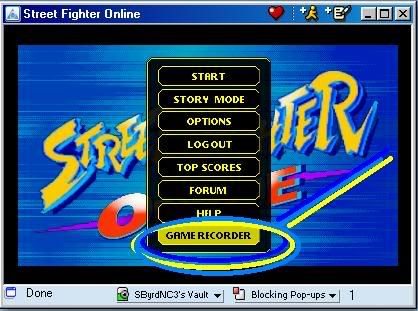 <span style='font-size:11pt;line-height:100%'>So you've watched your screen load(If your using the mirror version).You've read the front page news,and you find a promising future for SFO.By this moment if you planned to play the game you clicked the </span> "OK"button on the loading screen.Now your watching the intro credits one of which for"Drug Awareness".The other logo representing a product that APPEARS to be giving the approval of capcom.You should nowbe watching a brief intro movie forStreet Fighter Online.After Ryu's loud finish the log in screen appears.Enter your screen name and password if you have an account on Street Fighter Online if not you can log on as a "player" you wont recieve a rank,your points will be reset,but SFO is free.....atleast money wise....MB may be withdrawn when you log in similar to MSN's set up,but anyway.... you can record movies as a player...SFO makes no profit...aside from donations....that are openily accepted. :suspect: After Authentication is a success you should arrive on the Main Menu.At the Main Menu Scroll down to"GAME RECORDER",and double click or press enter on this subtitle. <span style='font-size:15pt;line-height:100%'>Act : II "Turn ON Recorder"</span>  <span style='font-size:11pt;line-height:100%'>Ok now you've entered the</span> "<span style='color:lime'>Recording Menu</span>".As the image is shown above you can turn on the recorder by simply clicking the "ON" button this is beside the "OFF" button.The recorder will now save any of the games you play in memory.The recorder will keep up to 5 of your fights/games in memory. After that, it will begin to delete them one by one and replace them with the new games you play.  IMAGE was provided to you by= DURO_ JaeDawg SolidSnake76(HOSTED BY) You will know if the match you are playing is being recorded, by the "Control Panel". Which will be displayed in the lower-left corner of the screen at all times. At any moment, you can press the "stop" button (third from the left) to stop your recording. If you press the "record" button (first from the left) any time after, you will begin recording a NEWmovie. All moves are saved to memory automatically after you end the match, leave the game, or press the "stop" or "eject" buttons (eject is the last button from the left) on the control panel. If you ever forget to turn ON the recorder from the main menu of the game, you can open up the game console (in-game chat) and type:/recorder 1  HOSTED BY SBYRD5 ADVISED BY DURO_ FIRST ATTEMPTED BY THE JESTER Edited By Warmor on 1110315117 |

|

|
|
03-04-2005, 03:44 PM
|
#2 |
|
Banned
Senior Member
Post Thanks / Like
Points: 0
Mentioned: 0 Post(s)
Tagged: 0 Thread(s)
Quoted: 0 Post(s)
|
<span style='font-size:15pt;line-height:100%'>Act : III "SAVING/EXPORTING"</span>
<span style='font-size:11pt;line-height:100%'>To even begin with to"</span> save" your games (Inwhich you can view them at a future date, or to send them to fellow SFO Community Members) You MUST use the "Export" function. If you do this successfully, all games will be erased when you close your browser window. To export your matches/games, first begin by heading towards the main menu and press the "Game Recorder" button. Select the game you wish to export from the list, then press the "Export"button. 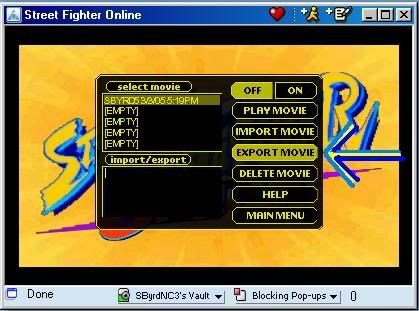 HOSTED BY SBYRD5 DONE BY SBYRD5 After this, it gets a little confusing, so follow my directions closely and don't slack up,because you've done well so far. Here are the steps as follow= <span style='font-size:13pt;line-height:100%'>Step 1:</span> <span style='font-size:11pt;line-height:100%'>After a few seconds, you will see green text appear in the lower left of the screen (the import/export box).</span>  HOSTED BY SBYRD5 DONE BY SBYRD5 <span style='font-size:11pt;line-height:100%'>Click anywhere on the text, and press</span> CTRL+A on your keyboard to select ALL of the green characters (If any problems accure you can also use the keyboard or the mouse to select the green text, but DO make sure to select ALL of it, or your game will be corrupt when you save it).  HOSTED BY SBYRD5 DONE BY SBYRD5 <span style='font-size:13pt;line-height:100%'>Step 2:</span> <span style='font-size:11pt;line-height:100%'>Press</span> CTRL+Xon your keyboard to copy/cutall of the green text into memory. If you see ANY green text left in the "import/export" box, then you did NOT copy all of the characters, and you have to go back to Step 1. <span style='font-size:13pt;line-height:100%'>Step 3:</span><span style='font-size:11pt;line-height:100%'>Open a text editor (</span>Microsoft Word,Word Perfect, or even Notepad ). For this tutorial,"WordPad" text editor (Mostily because it comes with every copy of Windows and has a "select all" function which is handy and makes a quick job). Go to Start,Programs, and Accessories. From there, click the "WordPad" icon. <span style='font-size:13pt;line-height:100%'>Step 4:</span><span style='font-size:11pt;line-height:100%'>Go to "</span>File" and "New". Select "Text Document" and press "OK". <span style='font-size:13pt;line-height:100%'>Step 5:</span><span style='font-size:11pt;line-height:100%'>Go to "Edit" & "Paste". You should now see new text appear on the screen. 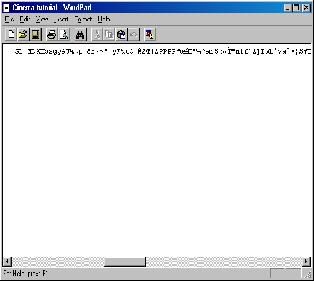 HOSTED BY SBYRD5 DONE BY SBYRD5 If your current document is still blank, go back toStep 1.</span> <span style='font-size:13pt;line-height:100%'>Step 6:</span><span style='font-size:11pt;line-height:100%'>Go to "</span>File" and "Save As..". Give the file any name you want, and save it on your hard disk. You can now send this file to ALL of your SFO Community Enemies or Allies or post it on the world wide web. Edited By SBYRD5 on 1109996519 |
|
|
|
|
03-04-2005, 03:45 PM
|
#3 |
|
Banned
Senior Member
Post Thanks / Like
Points: 0
Mentioned: 0 Post(s)
Tagged: 0 Thread(s)
Quoted: 0 Post(s)
|
<span style='font-size:15pt;line-height:100%'>ACT IV : IMPORTING/PLAYING RECORDING</span>
<span style='font-size:11pt;line-height:100%'>Begin by going back to "</span>WordPad" (That's the Editor that was used in this tutorial....but feel free to use whatever program that was mentioned previousily), or some other text editor that wasn't mentioned. <span style='font-size:13pt;line-height:100%'>Step 1:</span><span style='font-size:11pt;line-height:100%'>Now go to "</span>File" and then "Open". Find the game/movie that you want to import, and hit the "Open" button  IMAGE HOSTED BY SBYRD5 DONE BY SBYRD5 (if you don't see the file you want, make SURE the "Files of type:" box is set to "Text Document")  IMAGE HOSTED BY SBYRD5 DONE BY SBYRD5 <span style='font-size:13pt;line-height:100%'>Step 2:</span><span style='font-size:9pt;line-height:100%'>Go to "</span>Edit" and "Select All".  IMAGE HOSTED BY SBYRD5 DONE BY SBYRD5 <span style='font-size:13pt;line-height:100%'>Step 3:</span><span style='font-size:11pt;line-height:100%'>Go back to "Edit" and press "Copy".  IMAGE HOSTED BY SBYRD5 DONE BY SBYRD5</span> <span style='font-size:13pt;line-height:100%'>Step 4:</span><span style='font-size:11pt;line-height:100%'>In the game recorder menu, click anywhere in the "</span>Import/Export" box (where the green text usually appears) and press CTRL+V on your keyboard to paste the text. Please make sure the box is EMPTY(there is no green text) before you "paste" the new data. <span style='font-size:13pt;line-height:100%'>Step 5:</span> <span style='font-size:11pt;line-height:100%'>Press the "</span>Import" button. After a few seconds (or minutes) the movie should be added to the list of 5 moves that you can have in the game. You can now view/play it.  IMAGE HOSTED BY SBYRD5 DONE BY SBYRD5 If there is an error, and the movie is "corrupt", then you either did not copy all of the characters from the file correctly (go back toStep 1), or, the person who created the file did not copy all of the needed data into it. Edited By SBYRD5 on 1109998666 |
|
|
|
|
03-04-2005, 04:42 PM
|
#4 |
|
Senior Member
Junior Member
Post Thanks / Like
Points: 0
Mentioned: 0 Post(s)
Tagged: 0 Thread(s)
Quoted: 0 Post(s)

|
Wow sbyrd. You'll do better then me. Except the fact that you diden't use the edit button and most of your images don't work.
__________________
[img:sig_uid]http://tinypic.com/9sh4hw.gif[/img:sig_uid] |
|
|
|
|
03-04-2005, 05:27 PM
|
#5 |
|
Senior Member
Senior Member
Post Thanks / Like
Points: 0
Mentioned: 0 Post(s)
Tagged: 0 Thread(s)
Quoted: 0 Post(s)
|
They work now
__________________
[img:sig_uid]http://www.dr.dk/skum/boogie/_img/235x140/kanye_west.jpg[/img:sig_uid] Kanye west-Diamonds are forever Diamonds are forever Throw your diamonds in the sky if you feel the vibe Diamonds are forever The Roc is still alive every time I rhyme. |
|
|
|
|
03-04-2005, 07:00 PM
|
#6 |
|
Senior Member
Senior Member
Post Thanks / Like
Points: 0
Mentioned: 0 Post(s)
Tagged: 0 Thread(s)
Quoted: 0 Post(s)
 
|
Keep it up. Pinned.
__________________
If I don't respond to any IM's, I'm at work, so josh.maxwell@brinker.com, and I can e-mail you back almost immediatly. [img:sig_uid]http://i2.photobucket.com/albums/y19/warmor/warmorsig1.gif[/img:sig_uid] Created by: TremulantX |
|
|
|
|
03-04-2005, 07:03 PM
|
#7 |
|
Senior Member
Senior Member
Post Thanks / Like
Points: 0
Mentioned: 0 Post(s)
Tagged: 0 Thread(s)
Quoted: 0 Post(s)
|
Nice tutorial Sbyrd. Keep up the good work! :sly:
Edited By nosoul4evr on 1109991897
__________________
Helping to build a better player one beginer at a time http://nosoul4evr.cyberfuturism.com [img:sig_uid]http://nosoul4evr.cyberfuturism.com/images/xf.gif[/img:sig_uid] |
|
|
|
|
03-04-2005, 07:09 PM
|
#8 |
|
Senior Member
Junior Member
Post Thanks / Like
Points: 0
Mentioned: 0 Post(s)
Tagged: 0 Thread(s)
Quoted: 0 Post(s)
|
wow thats awesome. nicely explained. really well done

__________________
[img:sig_uid]http://img.photobucket.com/albums/v296/anarkyst/battousaiban.jpg[/img:sig_uid] Kill the spiders, save the butterflies! It seems rational until u realize that by striving 4 it, u become a spider urself. |
|
|
|
|
03-04-2005, 07:56 PM
|
#9 |
|
Senior Member
Junior Member
Post Thanks / Like
Points: 0
Mentioned: 0 Post(s)
Tagged: 0 Thread(s)
Quoted: 0 Post(s)
|
Congrats byrd.
__________________
[img:sig_uid]http://tinypic.com/9sh4hw.gif[/img:sig_uid] |
|
|
|
|
03-04-2005, 10:40 PM
|
#10 |
|
Banned
Senior Member
Post Thanks / Like
Points: 0
Mentioned: 0 Post(s)
Tagged: 0 Thread(s)
Quoted: 0 Post(s)
|
[quote
 ost_uid0="Venomous-Ninja"]Wow sbyrd. You'll do better then me. Except the fact that you diden't use the edit button and most of your images don't work.[/quote] ost_uid0="Venomous-Ninja"]Wow sbyrd. You'll do better then me. Except the fact that you diden't use the edit button and most of your images don't work.[/quote]:sarcasm: I had to get some new host for the SFO forum.. Imageavenue..and image shack wasn't doing it's job... And I had cut and paste my tutorial from battle grounds... but it came up..flawed..all bad grammar from bad html coding has been cleared up......and all hexidecimal.....coloring..has been cleared up... It's all good to go. :eh: So let's start sharing recorded games.. Edited By SBYRD5 on 1110150240 |
|
|
|
|
«
Previous Thread
|
Next Thread
»
 Linear Mode

|
|
