 03-04-2005, 03:44 PM
|
#2
|
|
Banned
Senior Member
Join Date: Jun 2002
Location: North Carolina
Posts: 6,549
Points: 0
Mentioned: 0 Post(s)
Tagged: 0 Thread(s)
Quoted: 0 Post(s)
|

<span style='font-size:15pt;line-height:100%'>Act : III "SAVING/EXPORTING"</span>
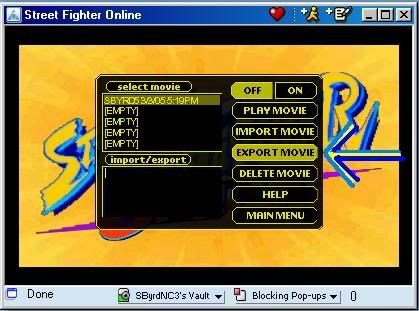
<span style='font-size:11pt;line-height:100%'>To even begin with to"</span> save" your games (Inwhich you can view them at a future date, or to send them to fellow SFO Community Members) You MUST use the "Export" function. If you do this successfully, all games will be erased when you close your browser window.
To export your matches/games, first begin by heading towards the main menu and press the "Game Recorder" button. Select the game you wish to export from the list, then press the "Export"button.
HOSTED BY SBYRD5
DONE BY SBYRD5
After this, it gets a little confusing, so follow my directions closely and don't slack up,because you've done well so far.
Here are the steps as follow=
<span style='font-size:13pt;line-height:100%'>Step 1:</span> <span style='font-size:11pt;line-height:100%'>After a few seconds, you will see green text appear in the lower left of the screen (the import/export box).</span>

HOSTED BY SBYRD5
DONE BY SBYRD5
<span style='font-size:11pt;line-height:100%'>Click anywhere on the text, and press</span> CTRL+A on your keyboard to select ALL of the green characters (If any problems accure you can also use the keyboard or the mouse to select the green text, but DO make sure to select ALL of it, or your game will be corrupt when you save it).

HOSTED BY SBYRD5
DONE BY SBYRD5
<span style='font-size:13pt;line-height:100%'>Step 2:</span> <span style='font-size:11pt;line-height:100%'>Press</span> CTRL+Xon your keyboard to copy/cutall of the green text into memory. If you see ANY green text left in the "import/export" box, then you did NOT copy all of the characters, and you have to go back to Step 1.
<span style='font-size:13pt;line-height:100%'>Step 3:</span><span style='font-size:11pt;line-height:100%'>Open a text editor (</span>Microsoft Word,Word Perfect, or even Notepad ). For this tutorial,"WordPad" text editor (Mostily because it comes with every copy of Windows and has a "select all" function which is handy and makes a quick job). Go to Start,Programs, and Accessories. From there, click the "WordPad" icon.
<span style='font-size:13pt;line-height:100%'>Step 4:</span><span style='font-size:11pt;line-height:100%'>Go to "</span>File" and "New". Select "Text Document" and press "OK".
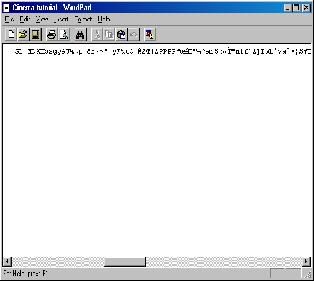
<span style='font-size:13pt;line-height:100%'>Step 5:</span><span style='font-size:11pt;line-height:100%'>Go to "Edit" & "Paste". You should now see new text appear on the screen.
HOSTED BY SBYRD5
DONE BY SBYRD5
If your current document is still blank, go back toStep 1.</span>
<span style='font-size:13pt;line-height:100%'>Step 6:</span><span style='font-size:11pt;line-height:100%'>Go to "</span>File" and "Save As..". Give the file any name you want, and save it on your hard disk. You can now send this file to ALL of your SFO Community Enemies or Allies or post it on the world wide web.
Edited By SBYRD5 on 1109996519
|

|

|